

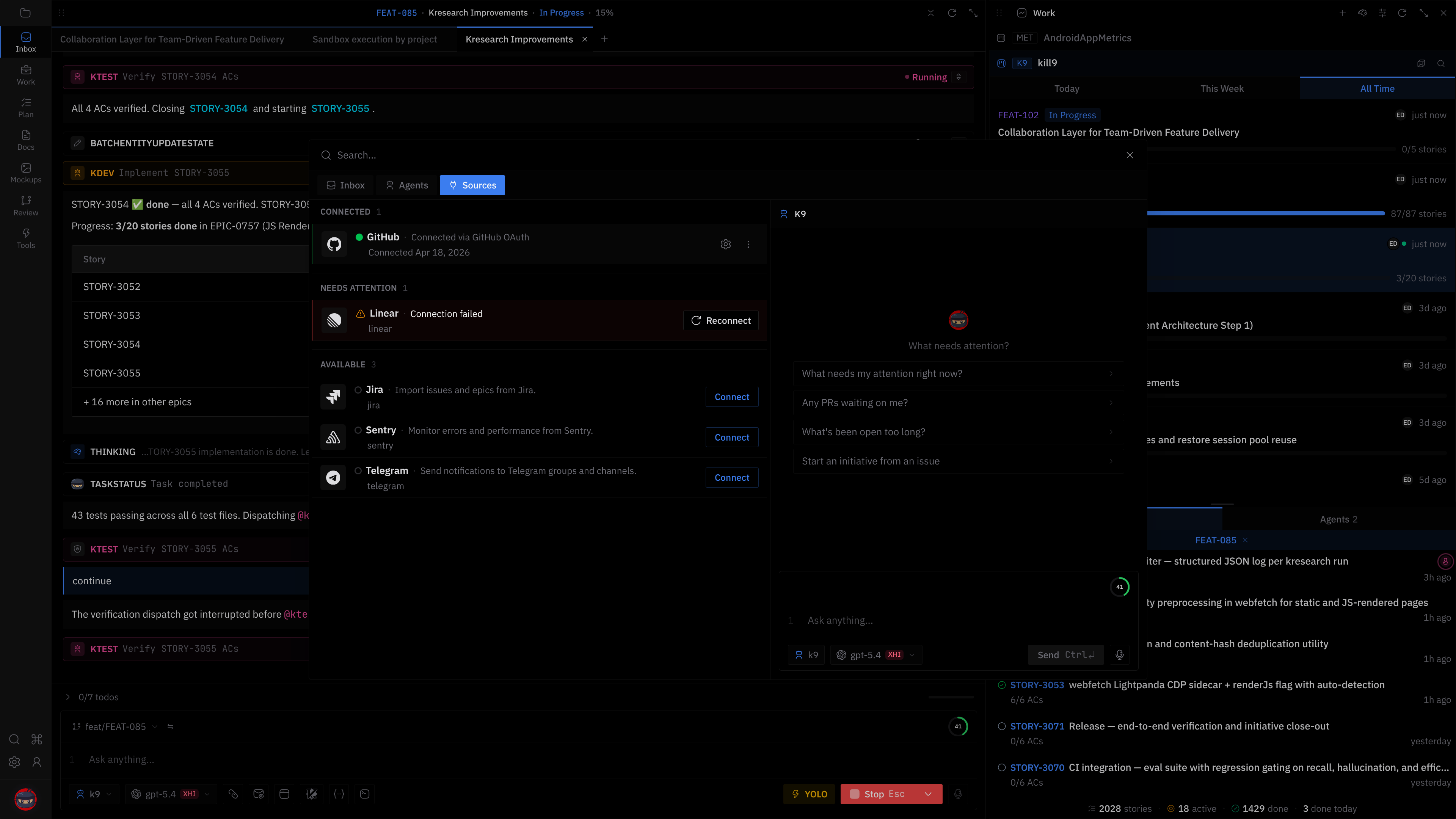
Integrations connect kill9 to external systems. Connected integrations surface work items in Inbox (Mod+1).
Available integrations
| Integration | Auth method | Plan required |
|---|---|---|
| GitHub | OAuth or Personal Access Token | Free |
| Linear | API key | Pro |
| Jira | URL + email + API token | Pro |
| Sentry | API key | Pro |
| Telegram | Bot token | Pro |
How to connect
GitHub
- Open the Extensions page from the command palette → Integrations tab.
- Click Connect on GitHub.
- OAuth launches in your browser — authorize kill9.
- Alternatively, click Use Personal Access Token to enter a PAT.
Linear
- Click Connect on Linear.
- Enter your API key in the setup dialog.
- Get your key from Linear Settings → API.
Jira
- Click Connect on Jira.
- Enter your Jira URL, email, and API token.
- Get your token from Atlassian Account Settings → Security → API tokens.
After connecting
Connected integrations show in the Integrations tab under Connected. Click a connected integration to see settings, reconnect, or disconnect.
Managing integrations
- Connected — click to open settings (auth method, connected time, reconnect, disconnect)
- Needs Attention — connection error, click to reconnect
- Available — click to connect
- Coming Soon — not yet available